 Nós
Nós
Nós
Nós is a messenger without servers, for Android and iPhone. Chats, groups, photos, voice messages, files and calls are end-to-end encrypted and travel through mailboxes on nodes that anyone can run, including your own computer. There is no phone number, no account and no company in the middle. "Nós" means "us" and "nodes" in Portuguese: the people, and the network they make.
Getting started
The first screen offers Create account, Import account and Explore without account.
- Create account: a name, an optional username and picture, and an accent color. "Your identity is your keys. No phone number required." Nothing is registered anywhere: the profile travels only inside your card, to your contacts.
- Save your recovery phrase: twelve words that are your account. Tap Show the words, write them down, then I wrote it down. Later is allowed; a banner on Chats reminds you until you confirm.
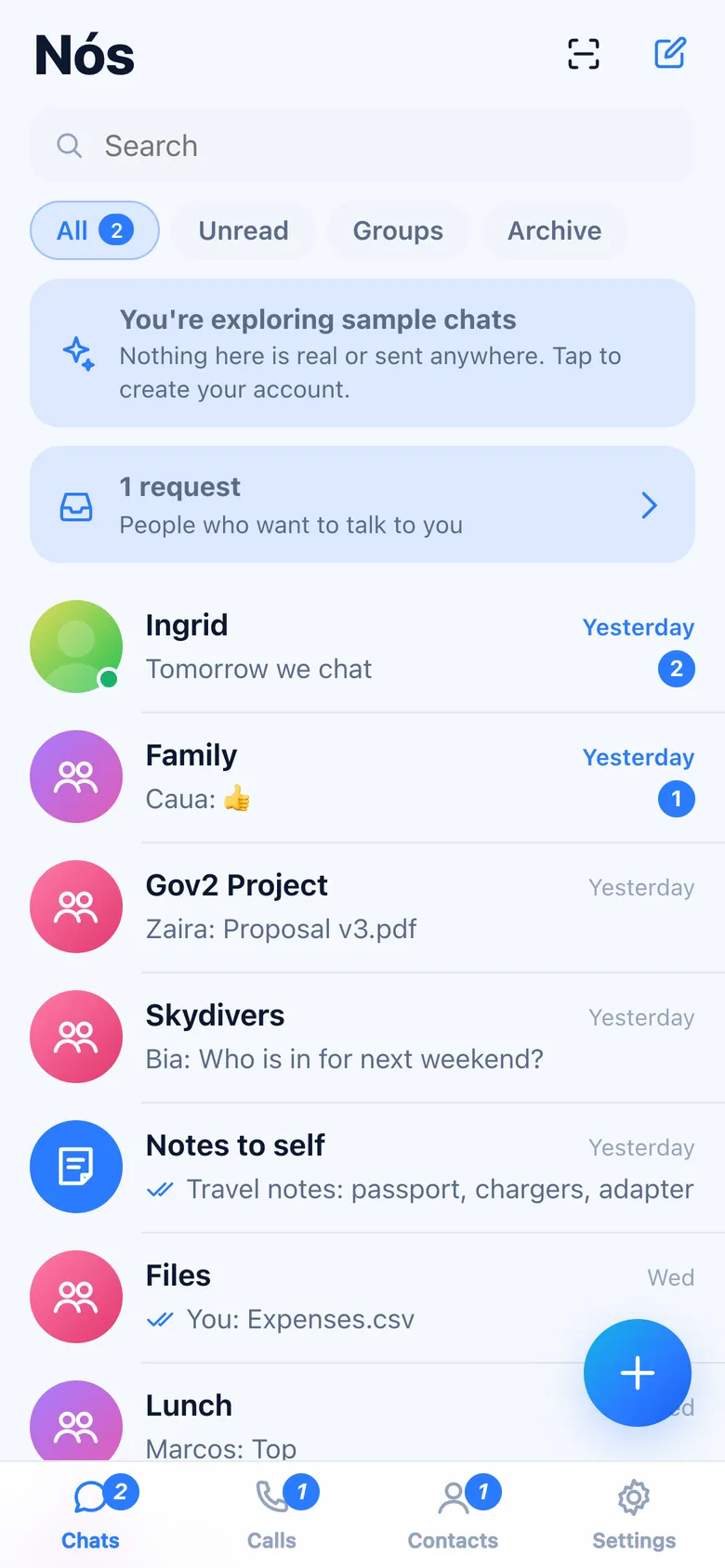
- Explore without account opens the app with sample people, groups and messages, kept in memory and sent nowhere. Calls, scanning and the network are off there. The banner "You're exploring sample chats" leaves and goes back to the first screen.
The tabs at the bottom are Chats, Calls, Contacts and Settings.
Adding people
Nobody can look you up by phone number or by name. People reach you with your card, which you choose who to give.
- My card (Contacts › the QR icon, or Discover › Share your card) shows a QR code and Share link. Whoever scans it or opens the link can say hello once. Invite links work for 30 days; Privacy › Invite links cancels them all.
- Scan QR code reads someone else's card, a node to add, a device to link or a safety number. Enter a link instead takes the same things pasted.
- Opening an invite link shows the person and Add contact. Adding exchanges your cards and stamps, so only the two of you can write to each other's mailboxes. The other side gets you as a contact right away ("joined from your invite").
- Search in network (Discover) finds someone by their key (64 characters), by an address like
[email protected](when their domain answers at/.well-known/nos/<name>), or opens an invite link. It finds only people who turned on Discoverable by key; they receive a request. - Introduce to someone (in a contact's details) sends each of two contacts the other's card. Each one sees "Introduced by …" in Requests and adds the other with Say hello.
Requests
People who found you by key, or were introduced, appear in Requests (a banner on Chats and Contacts). They can't write to you until you Accept. Ignore forgets them; Block also stops them at your mailboxes.
Chats
The list shows each chat with the last message, its time, delivery ticks, typing, drafts and the unread count. All, Unread, Groups and Archive filter it; the search field filters by name and text. Hold a chat (or right-click) to Pin, Mute, Mark as read, Archive or Delete chat. + opens Add a contact, Message a contact, New group and Notes to self (synced with your other devices).
Messages
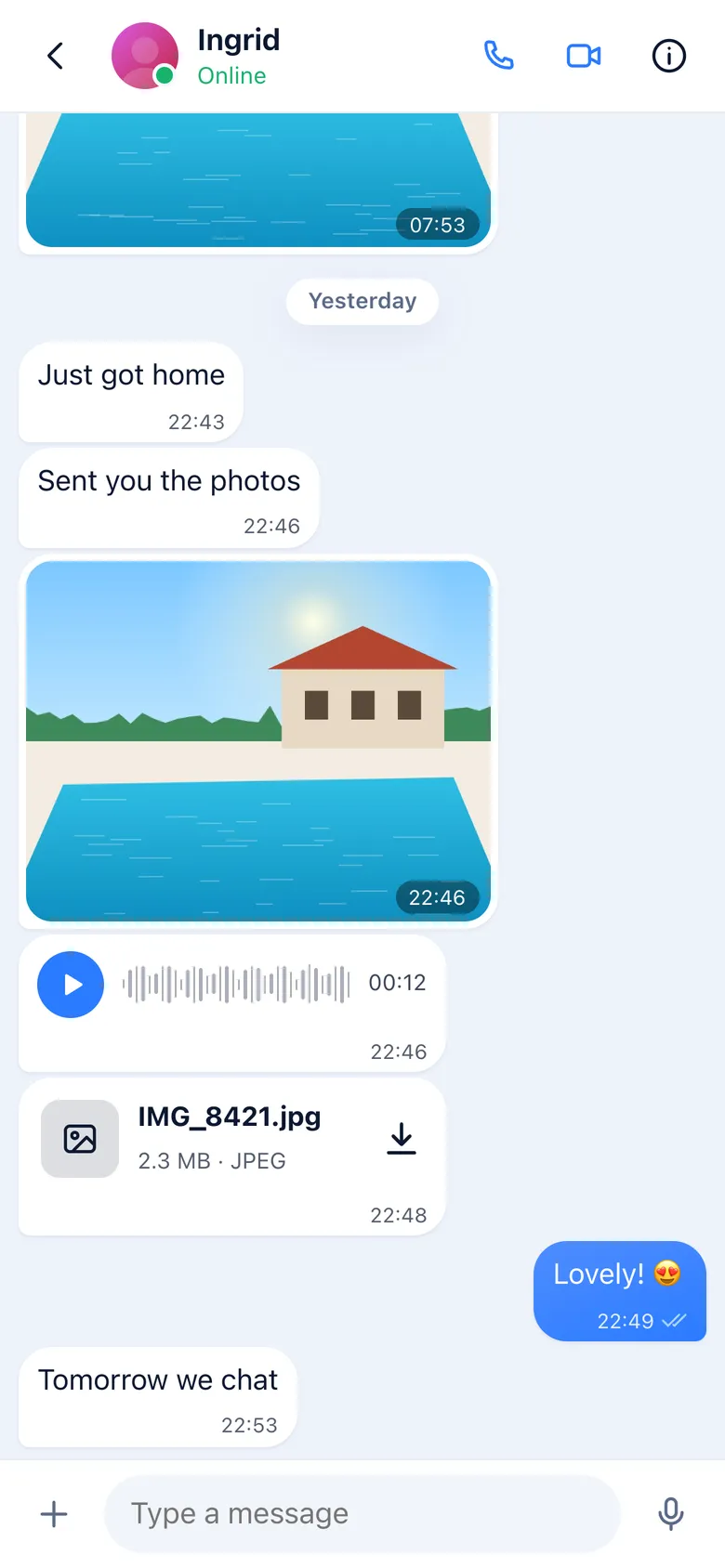
- Type and send; on phones Enter adds a line unless Settings › Chats › Enter sends is on.
- + in the composer sends a Photo or video, a Camera shot, a File (up to 100 MB) or My location (opens in OpenStreetMap).
- The microphone records a voice message: tap to start, then send or discard. Voice messages play with their waveform.
- Hold a message (or right-click) for the quick reactions and Reply, Forward, Save or share, Edit (your own text, within 48 hours), Info and Delete (for you, or for everyone within 48 hours). Double-click reacts with a heart.
- Photos show a small preview at once and download from the nodes; tap to open full screen. Files download when tapped.
Delivery states
| Mark | Means |
|---|---|
| Clock | Waiting on this phone (no connection, or no mailbox answered). It goes out by itself. |
| One check | In a mailbox of the other person. It waits there until their phone picks it up. |
| Two checks | Their device received and decrypted it. |
| Two blue checks | They read it (if both have read receipts on). |
| Warning | Not delivered (blocked, or no way to reach them). Info › Send again retries. |
Info on a message tells when it was written, sent to the mailbox, delivered and read; in groups, who received and read it.
Disappearing messages
In a chat's details, Disappearing messages (1 hour, 24 hours, 7 days, 90 days or Off) makes new messages disappear from both phones after that time. Privacy › Disappearing messages sets the timer for new chats.
Groups
New group takes a name, an optional picture and the contacts to add (up to 64 members). No server keeps the group: every member keeps the list of members, signed by the admins, and each message is encrypted once with its sender's key and posted to every member's mailboxes.
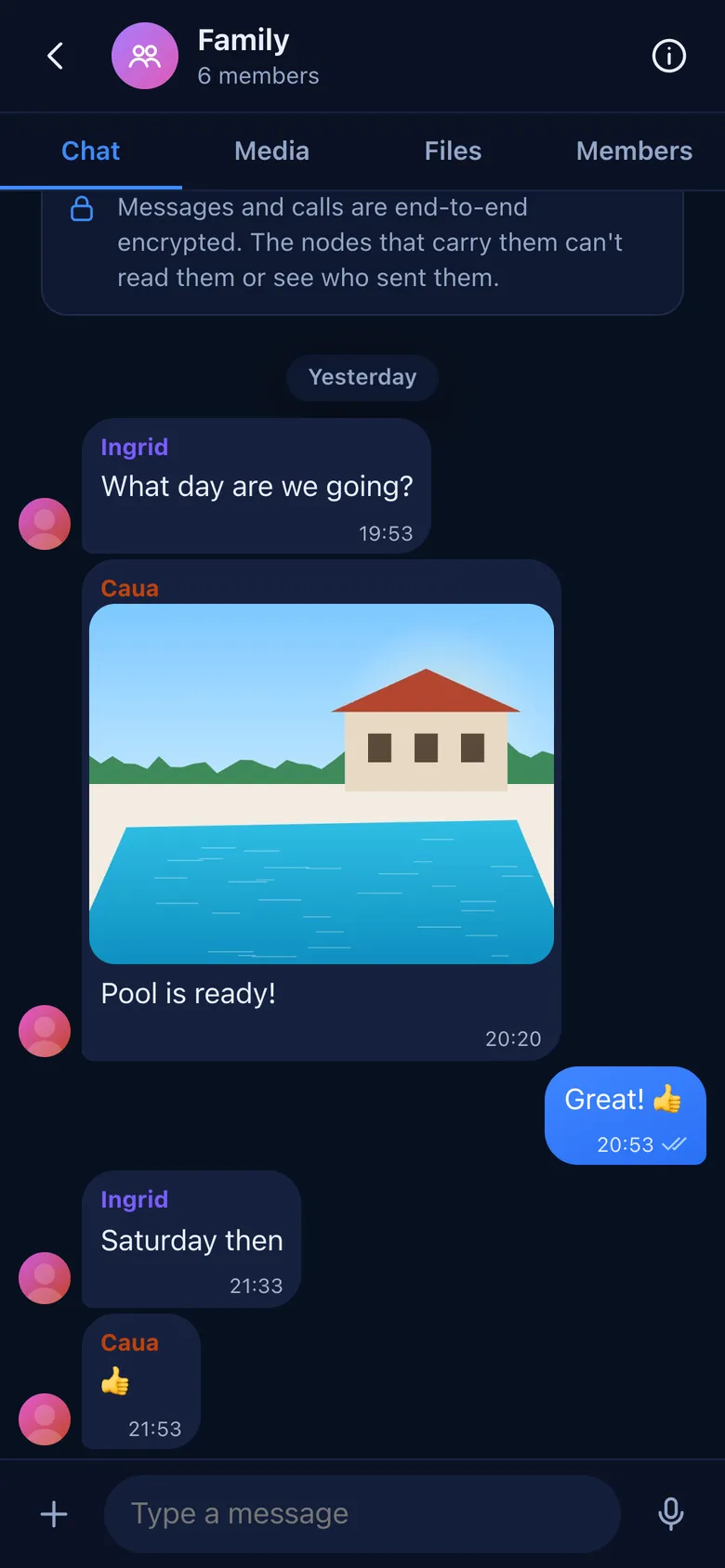
- The group's tabs at the top: Chat, Media, Files, Members.
- Admins can Add members, Remove from group, Make admin, rename the group and change its picture. Leave group leaves; the chat stays on the device.
- Members who aren't your contacts still reach you, and you them, for the group only: each member stamps their mailboxes for the group.
- When someone joins or leaves, the senders start new keys, so people who left can't read what comes after.
Calls
The phone and camera buttons on a contact's chat start a voice or video call. Calls go straight between the two devices (WebRTC), encrypted; the signalling travels as small envelopes that expire in a minute. During a call: Mute, Camera (turn video on or off), Flip and End. An incoming call shows Accept and Decline.
There is no relay for calls: when the two networks don't allow a direct path, the call can't connect, and the app says "Couldn't connect directly". The Calls tab lists your calls; tap the phone to call back.
Contacts
The list shows your contacts with their username, Online (when they share it), and your groups. A contact's details have Message, Call, Video, Verify safety number, Nickname (only you see it), media, disappearing messages, Mute, Introduce to someone, their Devices, Block, Clear chat and Remove contact.
Safety numbers
Each pair of contacts shares a 60-digit safety number. Compare it in person or on a call, or scan the code on their phone with Scan their code: if it matches, mark them Verified (a badge next to the name).
Blocking
Block cancels the stamp you gave that person on all your mailboxes: the nodes stop taking their envelopes. They aren't told. Settings › Privacy › Blocked lists and unblocks.
Notifications
Settings › Notifications has two modes:
- Instant: your mailboxes wake this device with an empty push through the browser's push service. It learns when to wake the device, never what was sent or by whom. The notification says "New message"; the message is fetched and decrypted when you open the app.
- Pure: no push at all. You see new messages when you open the app.
On the iPhone, notifications need the app on the Home Screen (Safari › Share › Add to Home Screen), then Turn on notifications. The Android app checks for messages while it is open. While the app is open, a banner shows new messages from other chats.
Devices
Settings › Devices lists your devices. To add one, open Nós on the new device, choose Import account › Link to my phone, name it, and on your phone tap Link a device and scan the code it shows (or open its link there). The new device gets your contacts and groups and receives every message from then on; earlier messages stay where they were. The recovery phrase stays on the main device, which also removes devices.
Network
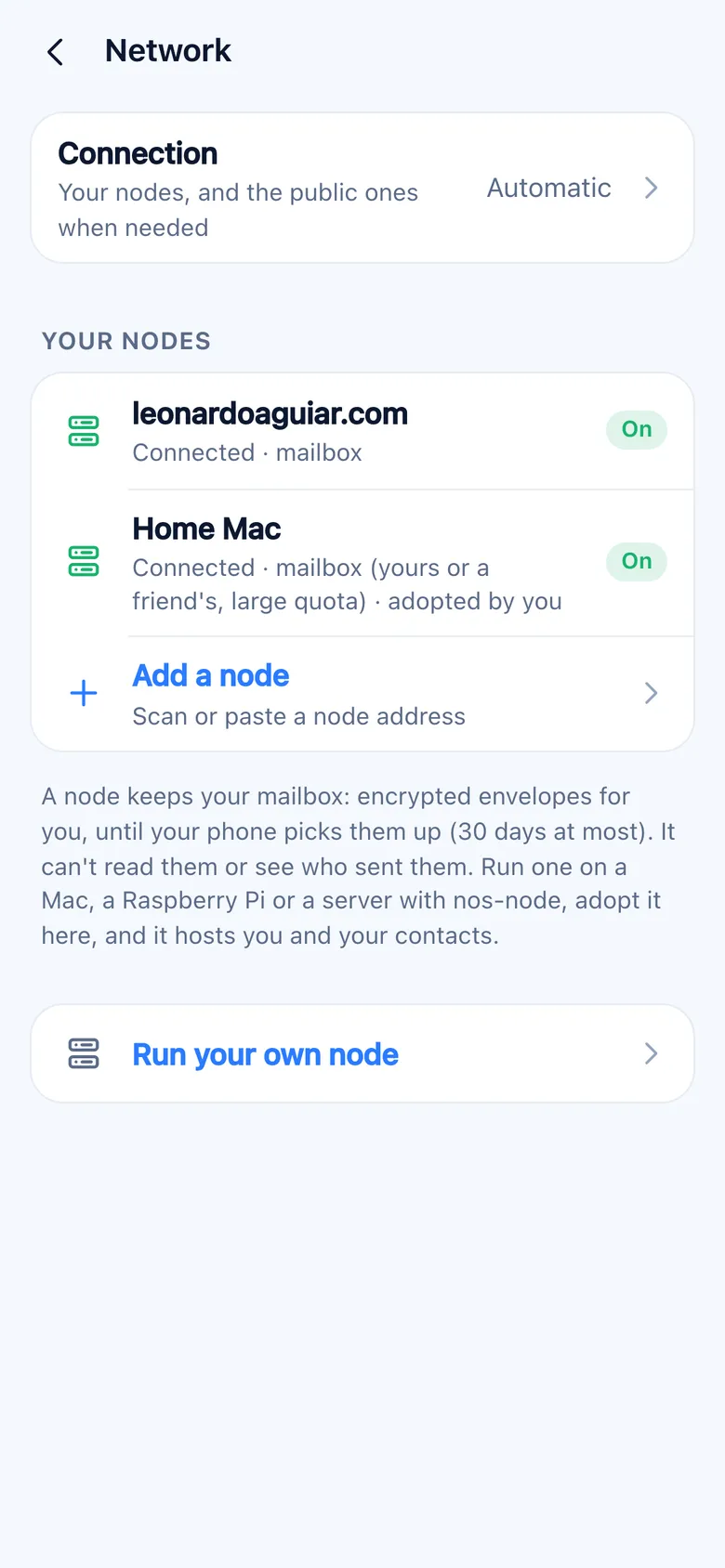
A node keeps mailboxes: encrypted envelopes, until the phone picks them up (30 days at most). It can't read them or see who sent them. Each person has up to three mailboxes on different nodes, listed in their card; a message goes to all of them and the first pickup clears it.
- Your nodes shows each node, whether it is connected, and your mailboxes on it.
- Connection: Automatic uses your nodes and the public one when you have none; Manual uses only nodes you added.
- Add a node scans or pastes the link a node prints. If the node hasn't been adopted yet, Adopt this node makes it yours: it hosts you and your contacts with larger quotas (500 MB of messages and 2 GB of media per person, 30 days) instead of the public ones (50 MB and 200 MB, 7 days for media).
- Without any node of your own, the app uses the public node at leonardoaguiar.com.
Run your own node
nos-node runs on macOS and Linux (arm64 and x86_64):
curl -fsSL https://leonardoaguiar.com/apps/nos/install.sh | sh
nos-node run
nos-node address
nos-node address prints a link and a QR code; open it in Settings › Network › Add node to adopt the node. Behind a home router, run it with --attach wss://leonardoaguiar.com/_/nos#f4eea0585b7f4cc4ecfab6a76082a724ee42c7b57d462377f6cf8344c785d00a: it keeps one connection to the public node, which relays apps to it without seeing anything but encrypted bytes. On a server, put it behind TLS (nginx or Caddy) and pass its public address with --url wss://…. --public also hosts strangers (with proof of work and small quotas); --stun 0.0.0.0:3478 answers STUN for direct calls. The node keeps its key, settings and data in ~/Library/Application Support/Nos Node (macOS) or ~/.local/share/nos-node (Linux). Running the install command again updates it.
Backup and recovery
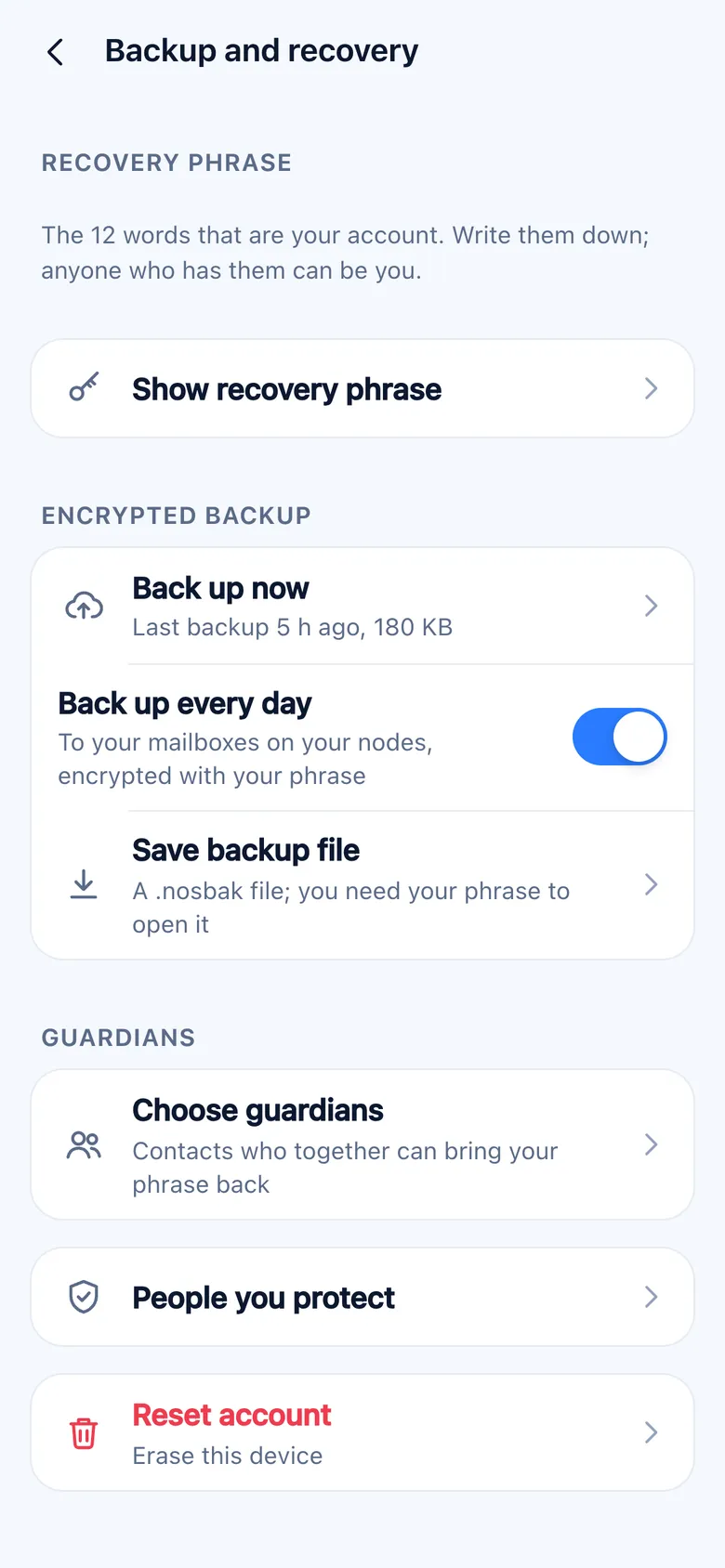
- Recovery phrase: Show recovery phrase (make sure nobody is looking).
- Back up now and Back up every day send an encrypted backup (contacts, groups, chats and the keys of this device; not the media) to your mailboxes, encrypted with a key from your phrase. Save backup file makes a
.nosbakfile you keep yourself. - Import account › Recovery phrase finds your card on the nodes, opens your mailboxes and brings back the latest backup. Without a backup, your identity, profile and mailboxes come back, but contacts and chats start empty: add your contacts again with your card.
- Import account › Backup file opens a
.nosbakwith its phrase.
Guardians
Choose guardians splits your phrase among 2 to 7 contacts, so that a number you choose of them together can bring it back; fewer reveal nothing. Each part goes to them encrypted. On a new phone, Import account › Ask my guardians shows a code and a link to send them; each guardian opens it in Nós, checks it is really you, and sends their part. When enough parts arrive, the account comes back. People you protect lists those who chose you.
Reset account erases this device. Without the phrase or guardians, the account can't come back: nobody else has it.
Settings
| Page | What it has |
|---|---|
| Profile | Picture, display name, username, about, accent color, My card. Changes reach your contacts right away. |
| Privacy | Introductions (Contacts or Nobody), Discoverable by key, Contacts can share your card, Invite links, Read receipts, Typing indicators, Online status, Disappearing messages for new chats, Blocked. |
| Notifications | Instant or Pure, Show sender and text, Banners while open. |
| Chats | Theme (System, Light, Dark), Text size, Enter sends, Archive all chats, Clear all chats. |
| Storage and data | Space used by photos, videos, voice messages and files on this device, Manage storage; auto-download of photos, videos and files (Always, Wi-Fi only, Never) and high-quality photos. |
| Devices | Your devices, Link a device, Remove. |
| Backup and recovery | Phrase, backups, guardians, People you protect, Reset account. |
| Network | Connection, your nodes, Add a node. |
| Advanced | Your key (as text and QR code), this device's key, Publish my card again, Send waiting messages now. |
There is no "last seen": no node keeps it. Typing and online status are tiny envelopes that expire in seconds, sent only to your contacts, and both can be turned off.
Protocol
- Identity: the twelve words (BIP39) derive the identity key (Ed25519, its public half is your key), the card key, the backup key, the stamp key and each mailbox's keys. Every device has its own Olm account.
- Card: a signed record with your devices, mailboxes and profile, the inside encrypted with the card key that only contacts have. Nodes store it under a name derived from that key, so a stranger who knows only your key can't find it.
- Sessions: one-to-one messages use Olm (the Double Ratchet, from Matrix's vodozemac), started with one-time keys kept in your mailboxes; groups use Megolm, one sender chain per member.
- Envelopes: sealed to the mailbox's key (X25519 and XChaCha20-Poly1305) and padded to 1, 4, 16 or 48 KB. The node sees the mailbox name, the stamp, a lifetime and the size step; nothing about the sender.
- Stamps: tokens signed by the mailbox owner for each contact, naming a holder key that must sign each envelope, with daily limits. Blocking revokes the stamp at the node. Strangers pay proof of work instead.
- Channel to nodes: Noise NK over WebSocket, with the node key known in advance, so neither a relay nor the TLS terminator in front of a node can read or forge anything. Nodes behind routers attach to a relay with Noise IK.
- Media: each file encrypted with its own key, cut into 48 KB pieces and addressed by the hash of the pieces.
- Wake-ups: Web Push (RFC 8291 and 8292) with a VAPID key made by the app, so any of your mailboxes can wake your phone without a central push key.
Install and updates
- Android: the APK from this site. Android 7 or later. The app asks this site once a day which version is the latest and shows Nós x is available in Settings; the new APK installs over the old one and keeps your account and chats.
- iPhone and iPad: the web app, from Safari. Open leonardoaguiar.com/apps/nos/app/, tap Share › Add to Home Screen and open Nós from the Home Screen. iOS 16.4 or later. It updates by itself.
- Any browser: the same address works in a recent Chrome, Safari, Edge or Firefox, with the account kept in that browser.
- The node: see Run your own node.
Privacy
Nós has no server of its own and no account. What leaves your device:
- Envelopes to mailboxes on nodes, sealed: the node sees a random mailbox name, the size step, the time and the internet address that connected.
- Your card on your nodes, signed and encrypted for your contacts.
- Media pieces on your mailbox and the recipient's, encrypted, until downloaded (7 days on public nodes, 30 on yours).
- Encrypted backups on your mailboxes, when on.
- Empty wake-up pushes, through Apple's, Google's or Mozilla's web push service, when Instant notifications are on.
- Calls, straight to the other device; the STUN server of Cloudflare (
stun.cloudflare.com) tells each phone its public address. - The version check of the Android app: one request a day to this site, sending nothing about you.
There are no usage statistics, no contact upload, no directory and no "last seen".